What is Claude AI? And how is it different from ChatGPT?
Claude is an AI chatbot made by a company called Anthropic. You type a question, it types back. Same basic idea as ChatGPT. It’s one of the handful of assistants most people end up choosing between, and it’s often the last one beginners hear about.
A note before we start: this article was drafted with Claude. We’ve checked every fact below against Anthropic’s own pages rather than against other write-ups, and we’ve said plainly where we couldn’t confirm something. But you should know whose tool wrote the first draft of an article about that tool.
The essentials:
- Claude is a chatbot from Anthropic. There’s a free plan; the popular paid one is $20 a month.
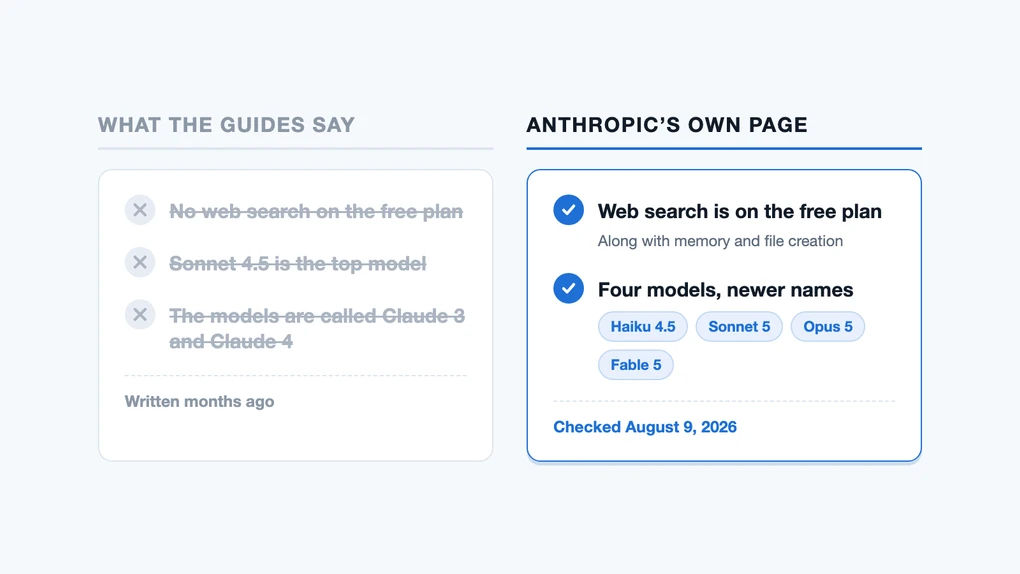
- The free plan includes web search and memory. A guide still ranking on page one says it doesn’t.
- It’s strong at reading, writing, and reasoning through documents. It doesn’t make images.
What is Claude AI?
Claude is a chatbot you talk to in plain language, in a browser or an app. Anthropic’s own help page describes it as a large language model — the text-prediction technology behind every chatbot — trained “to be a helpful, honest, and harmless assistant with a conversational tone.”
A word on Anthropic, the company behind it. That “helpful, honest, and harmless” phrasing isn’t ours: it’s Anthropic’s own, and it’s the frame it uses across its documentation. Whether that shows up in the answers you actually get is a judgment call, not something anyone can check against a page, and it’s worth remembering who drafted this article.
The name gets used for two different things, which trips people up. “Claude” is the app you chat with, and “Claude” is also the name of the family of models underneath it. Think of the app as the car and the models as the engines. You drive the car; you pick the engine from a menu.
You can use it at claude.ai in a browser, or download apps for Mac, Windows, iPhone, and Android. You have to be at least 18, and it’s only available in certain countries.
What can Claude actually do?
Claude does what you’d expect from an assistant: answering questions, drafting and editing writing, explaining things, working through code, and pulling apart long documents you upload.

Three of those jobs are the ones people wrongly assume cost money, so let’s be specific.
It searches the web. There’s a toggle in the chat window. Click the button in the lower left and switch on “Web search.” With it on, Claude looks things up and puts a citation next to each claim so you can check the source yourself. It can also open a specific link if you paste one.
It remembers. Memory across conversations is on the free plan’s feature list. That means it can carry context from one chat to the next instead of starting cold every time.
It makes files. It can write and run code to produce an actual spreadsheet or document, rather than just describing one.
What it doesn’t do is generate images. Anthropic’s feature list runs to more than twenty rows and image generation isn’t one of them. When web search is on, Claude can find and show you pictures from the web, each linked back to its source, but finding a picture and making one are different jobs. If you want to create an image from a description, you’d reach for a different tool. The nearest thing Anthropic sells is Claude Design, a paid beta that builds slides and page layouts from a description: visual output, but not a photo or an illustration.
Is Claude free?
Yes, and the free plan is more capable than you’d guess from reading about it. Here’s what Anthropic lists on it: chatting on web, iOS, Android, and desktop; writing and editing; generating code and visualizing data; web search; memory across conversations; creating files and running code; extended thinking, meaning it can reason through a hard question step by step before answering; and connections to Slack and Google Workspace.
The paid plans, as of August 2026:
- Pro — $20 a month, or $200 for a year, which works out to about $17 a month. More usage, more models to choose from, and projects for organizing your chats.
- Max — $100 or $200 a month. Five times or twenty times the usage of Pro. This is for people working with Claude all day.
- Team and Enterprise, for companies, from $20 per person per month billed annually ($25 monthly).
Paying buys you more usage, and on Claude it also unlocks separate products: Claude Code for programmers, Cowork for multi-step work, Science for research, and Design, a beta that builds slides, layouts, and clickable mock-ups from a description and exports them to PDF, PowerPoint, or Canva. Plus a research mode and a wider choice of models. For everyday chat, though, the free plan does the same core job.
Usage limits work in a way that surprises people. There’s no message count. Instead, you get a pool that refills on a rolling five-hour window, and how fast you drain it depends on how long your conversations are and which model you picked. Anthropic says as much directly: “there’s no fixed message count.” The paid plans add a weekly cap on top of the five-hour one.
One setting is easy to miss and awkward to undo. On the individual plans, Anthropic’s pricing page lists model training as opt-out, which means your conversations are used to train its models unless you go into settings and switch that off. The Team and Enterprise plans are listed the other way around: no training on your content by default. This is the same pattern across most AI tools, and we walk through what happens to your data in more detail.
What are Fable, Opus, Sonnet, and Haiku?
Fable, Opus, Sonnet, and Haiku are the four Claude models. The names are just names; they don’t mean anything you need to decode. Anthropic describes them like this:
- Haiku — the fastest and most cost-efficient.
- Sonnet — high-performance, for coding and agents.
- Opus — for complex coding and enterprise work.
- Fable — next-generation intelligence for tasks that run for a long time.
Which of them you can actually pick depends on what you pay. Anthropic lists “ability to use more Claude models” as a Pro feature, and its help pages say plainly that Fable “isn’t available on the Free plan.” Even on Pro it sits outside the normal allowance and runs on pay-as-you-go credits. So if you’re on the free plan, treat the four-model menu as something you’ll see written about more often than you’ll see it.

The current versions are Fable 5, Opus 5, Sonnet 5, and Haiku 4.5. In the app, the model you’re using appears under the text box on a computer, or at the top of the screen on a phone. Tap it to switch.
These numbers go stale fast. Anthropic has shipped several generations in the time it takes a blog post to get written and forgotten. If a guide tells you the most powerful Claude model is “Sonnet 4.5” or talks about “Claude 3,” it’s describing a lineup that’s already been replaced.
How is Claude different from ChatGPT?
Claude and ChatGPT overlap heavily. Both are chatbots built on large language models, both have free plans, both write and reason and handle documents. Most people would be fine with either.
The differences that actually show up in daily use:
| Claude | ChatGPT | |
|---|---|---|
| Made by | Anthropic | OpenAI |
| Free plan | Yes — web search, memory, file creation | Yes — web search, limited memory |
| Popular paid plan | $20/month (Pro) | $20/month (Plus) |
| Makes images from a description | No | Yes, limited on the free plan |
| Ads on the free plan | None | In the US, ads have appeared for free users since February 2026 |
| Best known for | Long documents, careful writing, code | Images and the biggest add-on ecosystem |
The honest summary: if you mostly want an assistant that reads and writes carefully, Claude is worth trying. A long report to pick apart, a difficult email, a piece of code to explain. If you want one tool that also makes pictures and has the biggest ecosystem of add-ons around it, ChatGPT covers more ground. Trying both costs nothing but the time to sign up. The ads are the one difference a free user feels daily, and we cover what changed in is ChatGPT free?
These two aren’t the only choices. Google Gemini is the third name most people weigh, and ChatGPT vs Gemini walks through picking between them. Our guide to the AI tools worth knowing covers the rest.
Why guides to Claude go out of date
Guides to Claude go out of date because Anthropic ships new models faster than the articles about them get updated. That’s true well beyond this one page.
We read the pages that currently rank highest for “what is Claude AI” and checked their claims against Anthropic’s own pages on the day we wrote this. One of them was wrong in two ways that would change what you’d decide.
Grammarly’s guide to Claude, last updated in January 2026, states that free users “don’t have access to web search at all.” Anthropic’s pricing page lists “ability to search the web” as a free-plan feature, and its web search help page has an entire section titled “Managing usage on free Claude accounts.” That’s not a fine distinction — a beginner reading the older guide would conclude the free plan can’t look anything up, and skip a tool that would have worked for them.
The same page names Sonnet 4.5 as “currently Anthropic’s most powerful model.” Anthropic’s pricing page today lists Fable 5, Opus 5, Sonnet 5, and Haiku 4.5.
That page isn’t dishonest. It was probably right when it was written. That’s the whole problem: AI tools change faster than the articles about them get updated, and a guide with no visible date reads exactly like a guide written yesterday.
So build the habit, with this article included: look for when a page was last checked. If it doesn’t say, treat its specifics as a starting point and confirm the ones you care about on the company’s own site. Prices, free-plan limits, and model names are the three that rot fastest.
We checked everything above against claude.com/pricing and Anthropic’s help center on August 9, 2026. Some of it will be wrong by the time you read it.
Sources
- Claude pricing — plans, prices, and the per-plan feature list
- Get started with Claude — what Claude is, where to use it, age and location requirements
- Enable and use web search — how search works, citations, and free-account usage
- Choose a Claude plan — plan prices and capacity
Frequently asked questions
Do I need an account to use Claude?
Yes. Unlike some chatbots, there's no way to try Claude without signing up. The account is free, but Anthropic requires you to be at least 18 and to be in one of the countries it supports, so it isn't open to everyone everywhere.
Can Claude search the web?
Yes, and free accounts can too. It isn't automatic: you switch it on with the button in the lower left of the chat window. Once it's on, Claude puts a citation next to each claim, so you can open the source instead of taking its word for it. One widely-read guide still says the free plan has no web search at all. It's out of date.
Can Claude make images?
Not from a description. Image generation isn't on Anthropic's feature list. Claude can find and show you pictures from the web when search is on, each with a link to the page it came from, but that's looking something up rather than drawing it. For making a picture from a prompt you'd want a different tool.
Which Claude model should I pick?
If you're not sure, leave whatever the app gives you. The four are Haiku (fastest), Sonnet (the everyday one), Opus (harder work), and Fable (the newest, and paid plans only). Which ones you can pick depends on your plan: Anthropic lists a wider choice of models as a Pro feature, and its help pages say Fable isn't on the free plan at all. Heavier models use up your allowance faster, so the fast one is often the sensible default.
Does Anthropic train on my conversations?
On the individual plans (Free, Pro, and Max), Anthropic's pricing page lists model training as opt-out, meaning it happens unless you turn it off in your settings. On Team and Enterprise plans it lists no training on your content by default. Settings like this change, so check yours rather than trusting any article, including this one.